

Beyond bug fixes: Why your banking app needs release notes [Best examples + ChatGPT prompts]
21.10.2024
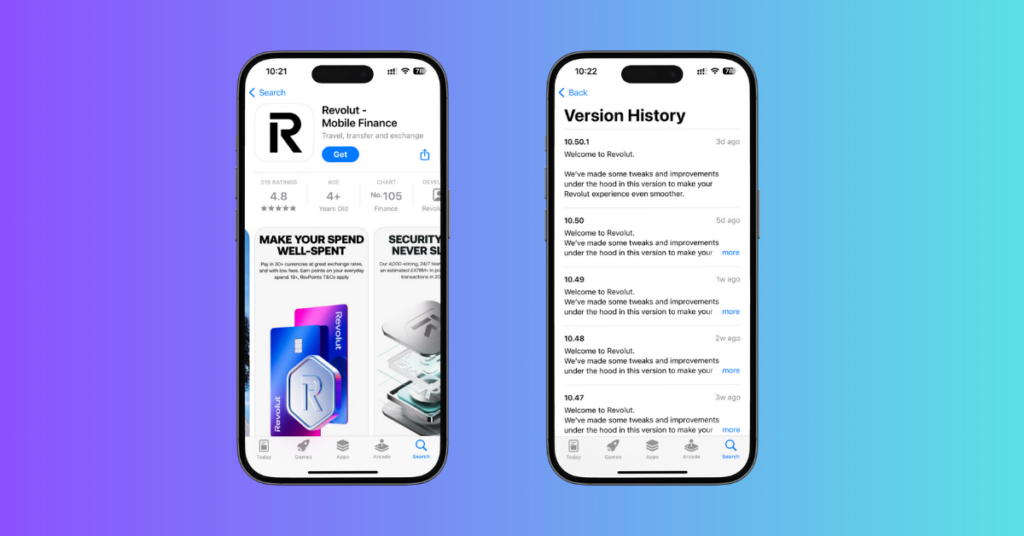
When you check out banking apps in the App Store or Google Play, you can see release notes under each version history. Some apps write generic things like “We fixed bugs and made improvements” or “We added new features”, which don’t give the reader any real information.
Even popular fintechs players like Wise, Revolut,don’t always prioritise informative release notes.
Why you should write release notes:
Reason #1 Brand Recognition
As tech journalist Freddie Harrison says, “Great copy should live everywhere.” Your app copy should reflect your brand, both inside and outside of your app.
Reason #2 Keep users updated
Good release notes should tell users exactly what’s new, what’s improved, and what bugs are fixed. This helps convince users to update to the latest version.
Reason #3 ASO Optimization
Keywords and detailed release notes can improve your app’s ranking in App Store and Google Play search results.
Reason #4 Get Feedback
When users are informed about changes and can have a two-way conversation with their banking app providers, they can provide more specific and helpful feedback to the developers.
Do users care about release notes?
As it turns out, they do! In a survey by technical writer James Scott, 84% of 372 respondents said that they read release notes regularly. They do it for several reasons:
- Stay updated with new features / changes
- Understand technical details
- Find them interesting
- Enjoy reading funny notes
- Keep an eye on competitors
You can learn more about the specific reasons why people read release notes in Scott’s article here.
The best release notes examples: Monzo & N26
Release notes are often an afterthought – a dry list of technical details or no details. But Monzo and N26 used them as a communication tool. Their secret? Writing release notes that users actually want to read. Let’s look into what makes their copy so effective.
Monzo
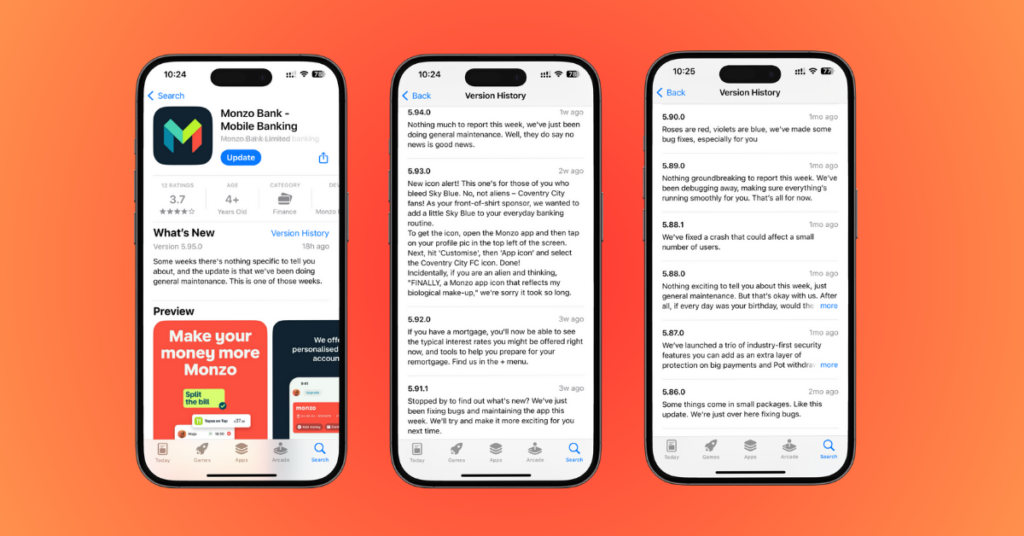
- Engaging Language: They use casual, friendly language that’s easy to understand. Phrases like “New icon alert!” and “No, not aliens” make the updates more engaging.
- Focus on User Benefits: They clearly explain how the changes benefit the user. For example, they highlight that the new icon is for Coventry City fans and provide instructions on how to get it.
- Humor and Personality: The notes inject humour to make them more enjoyable to read. The joke about aliens adds a lighthearted touch.
- Transparency: Even when there are no major updates, they are transparent about it “Nothing much to report this week…”, “Nothing groundbreaking to report and maintain a positive tone “Well, they do “say no news is good news.”
N26
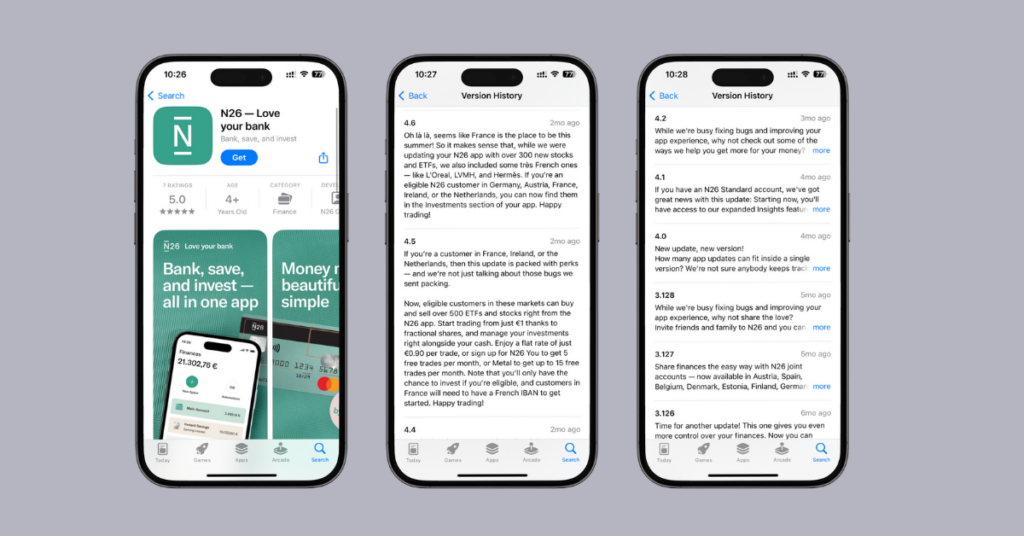
- Targeted Information: They clearly specify which countries and users are affected by each update, making the information relevant and avoiding confusion.
- Enthusiastic Tone: Phrases like “Oh là là” and “Happy trading!” create an engaging tone.
- Benefit-Oriented Language: They highlight the advantages of the new features, such as access to French stocks and the ability to manage investments alongside cash.
- Clarity in Details: They clearly explain the requirements (e.g., eligibility, French IBAN) and pricing (€0.90 per trade, free trades with N26 You/Metal).
How to write release notes: 4 main rules
- When you’re writing release notes, remember you’re talking to real people, not robots. Don’t use overly technical language; write like you’re talking with a friend. Keep it clear, concise, and engaging.
- Since app stores don’t give you formatting options (no bolding or italics!), use bullet points and spacing to make your notes easy to skim.
- And don’t forget about character limits. Google Play has a 500-character limit, while the App Store gives you a bit more room with 4000 characters.
- If your app supports multiple languages, choose one main language for your Google Play notes to avoid exceeding the character limit. You can use one or two languages for the App Store.
How to automate release notes writing with ChatGPT/Gemini (App Store + Google Play)
Your developers or copywriters can use this prompt template to automate writing consistent, clear changelogs:
For Google Play
Please generate release notes for [Google Play] for [App Name] app with these updates:
[List of updates]
The notes should be up to [500] characters.
Also, include a call to action at the end.
Our tone of voice: Business Casual
[Provide your ideal example]
Here is an example:
Version X.X.X
New Feature:
Scam Protection: We now send push notifications to warn you about potential payment scams. Please don’t ignore these alerts to keep your money safe!
Found a bug? Let us know! We’ll squash it on our next release.
For App Store
Please generate release notes for [App Store] for [App Name] app with these updates:
[List of updates]
The notes should be up to [4000] characters.
Also, include a call to action at the end.
Our tone of voice: Business Casual
[Provide your ideal example]
____
We hope our analysis encourages fintech and banking apps to step up their communication. We’re looking forward to seeing more creative and user-friendly release notes in the future.
See your competitors release notes
Our Market Inspector provides you app version history and user reviews in one place.Similar posts
4Rize Announces Closure and New Directions
After careful reflection, we have decided to discontinue the service as of 11 September 2025.
Uzbekistan banking and fintech apps multi-languages support trends
Analysing Uzbekistan banking and fintech apps' multi languages support trends across 41 banks and fintech companies.